
Your S3 buckets,
right on your Mac.
OpenBucket is a free, open-source S3 browser, built with SwiftUI, for browsing, previewing, sharing and managing files in Amazon S3 and S3‑compatible storage.
Version 0.2.1 · macOS 26 or later · Apple silicon and Intel · Signed and notarized

Made for the Mac.
Not a web console in a window.
OpenBucket uses SwiftUI and the macOS 26 look, and it works with the parts of macOS you already know.
Quick Look
Press Space or ⌘Y to Quick Look images, video and documents straight from the bucket.
Spotlight and Shortcuts
Favorite folders show up in Spotlight. App Intents open locations and copy share links.
s3:// links
Open s3:// links from any app, or paste an S3 console URL into Go to Location.
Keyboard first
⌘1 and ⌘2 switch grid and list, ⌘↑ goes up a folder, ⌘F finds, ⌥⌘I shows Info.
Selection you know
⌘A, ⇧-click and ⌘-click in grid and list. Drag files straight out to Finder.
Keychain
Access keys and session tokens you enter are stored in your macOS Keychain.
Amazon S3, and the S3 storage you run yourself.
- Custom HTTP or HTTPS endpoints, with path-style or virtual-host addressing and your region.
- Access keys with an optional session token, or a named AWS CLI profile, including roles and IAM Identity Center.
- Open a bucket you know even when your key can't list every bucket, and start in any folder.
Where it's been tested
- Garage 2.4.1
- Tested
- Browsing and the full write round trip pass live tests. The screenshots use it.
- Adobe S3Mock
- Tested
- The write round trip passes.
- Amazon S3
- Implemented
- Built on Soto; no account-backed live test in the repository yet.
- MinIO, RustFS and others
- Not yet tested
- No live result yet.
Everything you do with files.
Now in your buckets.
- Preview
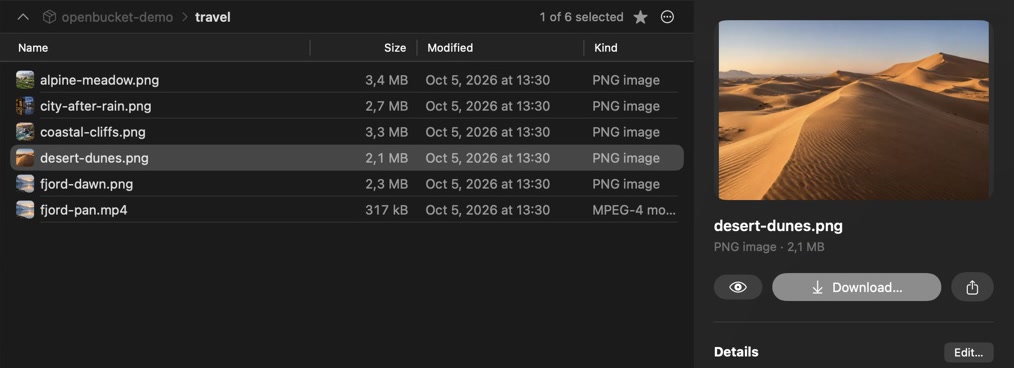
- Image and video thumbnails, inline playback, and an Info panel with headers, metadata, tags and photo EXIF.
- Share
- Presigned links that expire after 15 minutes to 7 days, with a QR code for your phone.
- Versions
- On versioned buckets: version history for each file, deleted files you can bring back, and Browse As Of any date.
- Transfers
- Files, selections and whole folders up and down side by side, with progress and cancel. Large files go in parts.
- Storage Overview
- A treemap of any folder by size and kind, its storage classes and its largest files.
- Compare with Local Folder
- Check a local copy by size and checksum, then update S3 or your Mac. Nothing is deleted on either side.

Read-only until you say so.
Every connection starts read-only. Uploads, moves, renames and deletes appear only after you turn on Allow changes for that connection, and OpenBucket checks the setting again before each change.
Keys stay in Keychain
Connection settings hold only a reference to your credentials.
Updates never delete
Compare updates new and changed files only. A replaced file on your Mac goes to the Trash.
Links expire
Share links are signed on your Mac and stop working after the time you choose.
Free and open source.
OpenBucket is MIT-licensed and built in the open with Swift 6, SwiftUI and Soto. Every release is signed with a Developer ID, notarized by Apple, and published with its SHA-256 checksum.
Get OpenBucket.
Download for macOSVersion 0.2.1 · macOS 26 or later · An early release: please report what breaks on GitHub.